[TOC]

ubuntu 12.04 LTS 上安装solr4

How to setup solr 4 on tomcat in Ubuntu server 12.04 LTS

  1. 安装tomcat

    apt-get install tomcat6 curl
    
  2. 下载solr4

  3. 选择一个路径作为SOLR_HOME, 这里用/opt/solr

  4. 解压下载的文件, 然后将以下内容宝贝到相应目录

  5. 拷贝example/solr/* 到 /opt/solr/

  6. 拷贝example/webapps/solr.war 到 /opt/solr/
  7. 拷贝example/lib/ext/* 到 /var/lib/tomcat6/shared

  8. 修改 /opt/solr/collection1/conf/solrconfig.xml

    <dataDir>${solr.data.dir:/opt/solr/data}</dataDir>
    
  9. 创建/opt/solr/data

1
2
$ mkdir /opt/solr/data
$ sudo chown tomcat6 /opt/solr/data

/opt/solr将会是:

1
2
3
4
5
6
7
8
$ tree -d
├── bin
├── collection1
│   └── conf
│       ├── lang
│       ├── velocity
│       └── xslt
└── data

7. 创建/etc/tomcat6/Catalina/localhost/solr.xml

1
2
3
4
<?xml version="1.0" encoding="utf-8"?>
<Context docBase="/opt/solr/solr.war" debug="0" crossContext="true">
  <Environment name="solr/home" type="java.lang.String" value="/opt/solr" override="true"/>
</Context>

8.重启tomcat6

1
 $ sudo service tomcat6 restart

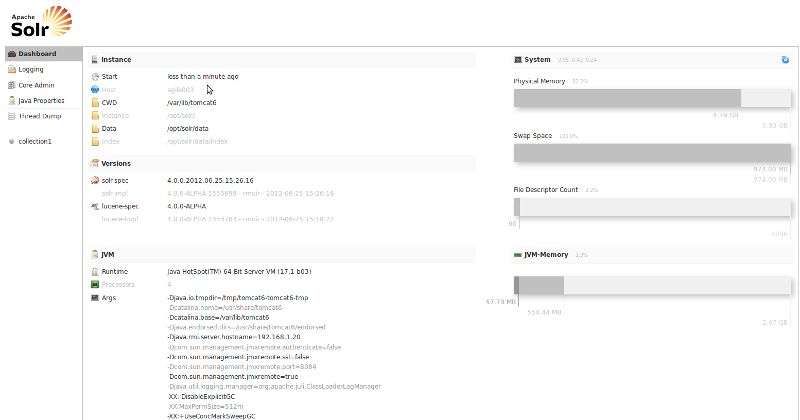
9.访问 http://localhost:8080/solr

solr管理面板

配置中文分词器

使用默认分词

使用默认分词

使用自带的cjk分词

打开 http://localhost:8081/solr/#/collection1/analysis

使用自带的cjk分词

配置IK中文分词
  1. 下载 IK Analyzer 2012FF_hf1.zip 解压
  2. 将 IKAnalyzer2012FF_u1.jar 拷贝到 /var/lib/tomcat6/webapps/solr/WEB-INF/lib
  3. 修改 /opt/solr/collection1/conf/schema.xml
1
2
3
4
<fieldType name="text_ik" class="solr.TextField" omitNorms="false">
    <analyzer type="index" class="org.wltea.analyzer.lucene.IKAnalyzer"/>
    <analyzer type="query" class="org.wltea.analyzer.lucene.IKAnalyzer"/>
</fieldType>

4.重启tomcat服务

1
$ ![enter image description here][7]sudo service tomcat6 restart
  1. 打开 http://localhost:8081/solr/#/collection1/analysis

测试IK中文分词

IK扩展字典

土豪金分词

土豪金IK分词

土豪和金被分开索引, 我们希望的是土豪金也能被索引

  1. 创建目录/var/lib/tomcat6/webapps/solr/WEB-INF/classes
  2. 拷贝IKAnalyzer.cfg.xml stopword.dic到classes目录
  3. 修改IKAnalyzer.cfg.xml
1
2
3
4
5
6
7
8
9
<?xml version="1.0" encoding="UTF-8"?>
<!DOCTYPE properties SYSTEM "http://java.sun.com/dtd/properties.dtd">  
<properties>  
  <comment>IK Analyzer 扩展配置</comment>
  <!--用户可以在这里配置自己的扩展字典 -->
  <entry key="ext_dict">ext.dic;</entry> 
  <!--用户可以在这里配置自己的扩展停止词字典-->
  <entry key="ext_stopwords">stopword.dic;</entry> 
</properties>
  1. classes目录下创建 ext.dic, 加入土豪金
  2. 重启tomcat
1
$ sudo service tomcat6 restart

测试土豪金

土豪金IK分词-扩展词典

sunspot

sunspot方便rails使用solr, 本地测试直接使用sunport_solr, 而production环境是使用ubuntu的tomcat, 需要做一些配置 数据库用的mongodb

  1. 修改core的名字 collection1 –> production

    • /opt/solr/collection1 –> /opt/solr/production
    • 修改/opt/solr/production/core.properties

        name=production
      
    • 重启tomcat

  2. 修改schema.xml, 内容替换为 schema.xml

  3. Gemfile 加入 sunport, sunport-mongo支持

1
2
gem "sunspot_rails", '2.1.0'
gem 'sunspot_mongo', github: 'yaoyi/sunspot_mongo'
  1. 配置 sunspot.yml
1
2
3
4
5
6
7
8
production:
  solr:
    hostname: localhost
    port: 8080
    log_level: WARNING
    path: /solr/production
    # read_timeout: 2
    # open_timeout: 0.5
  1. 重建索引
1
RAILS_ENV=production bundle exec rake sunspot:mongo:reindex

FAQ:

使用ngAnimate的时候还是要小心 比如在animate结束之前, dom是不会从页面上移除的, 这时候如果watch某个collection, collection可能马上变了,但是dom还是之前的个数,就会导致出现问题

See the Pen angular animate demo by yaoyi (@yaoyi) on CodePen

Written with StackEdit.

To summarize:

if code is queued using $evalAsync from a directive, it should run after the DOM has been manipulated by Angular, but before the browser renders if code is queued using $evalAsync from a controller, it should run before the DOM has been manipulated by Angular (and before the browser renders) — rarely do you want this if code is queued using $timeout, it should run after the DOM has been manipulated by Angular, and after the browser renders (which may cause flicker in some cases)

The $evalAsync queue is used to schedule work which needs to occur outside of current stack frame, but before the browser’s view render. — http://docs.angularjs.org/guide/concepts#runtime

Okay, so what’s a “stack frame”? A Github comment reveals more:

if you enqueue from a controller then it will be before, but if you enqueue from directive then it will be after. — https://github.com/angular/angular.js/issues/734#issuecomment-3675158

Above, Misko is discussing when code that is queued for execution by $evalAsync is run, in relation to when the DOM is updated by Angular. I suggest reading the two Github comments before as well, to get the full context.

So if code is queued using $evalAsync from a directive, it should run after the DOM has been manipulated by Angular, but before the browser renders. If you need to run something after the browser renders, or after a controller updates a model, use $timeout(…, 0);
See also http://stackoverflow.com/a/13619324/215945, which also has an example fiddle that uses $evalAsync().

Written with StackEdit.

angular.module 可以用来创建或者获取一个module. angular.module 接受两个参数,第一个参数是module的名字,第二个参数是可选的, 定义module的依赖 同一个调用根据是否传入第二个参数来区分创建或者获取module

Angular Create Module

创建一个module

1
2
3
4
var myModule = angular.module( 'moduleName', [ 
 'dependency1' ,
 'dependency2' 
]);

创建同名的module, 前一个module会被覆盖,

Angular Get Module

“`

“`

Written with StackEdit.

angularjs的seo

用angularjs写一个SAP,最头疼就是seo, 即搜索引擎无法索引angularjs的网站,如果你的网站不能被搜到,那看起来就像你的网站从来没有存在过一样。

当google索引你的网站

google爬取angularjs网站的时候,因为angularjs没执行, html中angularjs的markup没有被替换为响应的数据, 所以当google索引你网站的页面的时候,它看到的是这样

1
<h1> -  - </h1>

或者可能是这样

1
<h1></h1>


而你希望被爬到的是这样

<h1>Awesome App -User Profile - Fred James</h1>

目前基本上有两种方案来解决这个问题

  1. 需要在server-side写一些代码,判断当googlebot访问你的网站的时候返回一个你网站的javascript-free version,也就是静态html页. 但这样做的麻烦显而易见,就是需要做额外的判断,破坏了服务端的代码的结构,对静态页的维护也增加了运营成本
  2. 现在网上关于angularjs使用的比较多的方案就是利用PhantomJS, 接下来就详细说下这个方案

这个方法不适用于百度,因为根据百度给站长的建议中的表述,百度爬虫无法爬取javascript中内容

google对于基于javascript的SPA网站有一个解决方案,这里简单概括下要点:

  • google只会索引#!
  • googlebot

aa

See the Pen jqJGk by yaoyi (@yaoyi) on CodePen

JS Bin

Written with StackEdit.

官网tab directive http://docs.angularjs.org/guide/directive

官网的module

http://docs.angularjs.org/guide/directive

1
2
3
4
5
6
7
8
9
10
11
12
13
14
15
16
17
18
19
20
21
22
23
24
25
26
27
28
29
30
31
32
33
34
35
36
angular.module('dragModule', []).
  directive('myDraggable', function($document) {
    return function(scope, element, attr) {
      var startX = 0, startY = 0, x = 0, y = 0;
 
      element.css({
       position: 'relative',
       border: '1px solid red',
       backgroundColor: 'lightgrey',
       cursor: 'pointer'
      });
 
      element.on('mousedown', function(event) {
        // Prevent default dragging of selected content
        event.preventDefault();
        startX = event.pageX - x;
        startY = event.pageY - y;
        $document.on('mousemove', mousemove);
        $document.on('mouseup', mouseup);
      });
 
      function mousemove(event) {
        y = event.pageY - startY;
        x = event.pageX - startX;
        element.css({
          top: y + 'px',
          left:  x + 'px'
        });
      }
 
      function mouseup() {
        $document.unbind('mousemove', mousemove);
        $document.unbind('mouseup', mouseup);
      }
    }
  });

使用jquery-ui的drag and drop

https://github.com/codef0rmer/angular-dragdrop

太重

另外一个不错的实现 http://logicbomb.github.io/ng-directives/drag-drop.html

有很多angularjs的directive http://www.directiv.es/

native drag-and-drop

http://blog.parkji.co.uk/2013/08/11/native-drag-and-drop-in-angularjs.html

对应的实现 http://ganarajpr.github.io/angular-dragdrop/

在onDrop中要記得不要刪除drag的element, 否則element的dragend就不會被調用,一些binding就不能得到清除, 如果要刪除元素,請在on-drop-success中操作, drag和drop操作獨立有好處,但也增加了維護的複雜度

上述的實現,在判斷是否成功drop的時候,是在drag的元素的 dragend事件中判斷 e.dataTransfer.dropEffect是否為none, 因為設置ui-on-drop的元素,會綁定dragover等事件,並且在 dragover的時候將e.dataTransfer.dropEffect設置為”move” 所以在dragend中如果為move,則認為element drop sucess. 但這個帶來的問題就是, 沒有辦法和plupload的drop上傳和平共處, 通過dropEffect判斷是否成功也不夠獨立, 覺得應該需要設置獨立的標誌

嘗試直接在onDrop事件中調用dataTranfer.setData, 但是失敗了 因為出於安全考慮 在dragstart事件中,可以調用e.dataTransfer.setData設置任何的值, 在onDrop中通過e.dataTransfer.getData獲取 但是dragenter等中間事件沒有權限訪問這些值,擔心dragover的一些中間元素會設置listener從而獲取這些值 這裡有一些解釋http://stackoverflow.com/questions/8762635/getting-the-filename-during-the-dragenter-event

經測試, 在onDrop中e.dataTransfer.setData不能成功

想參考ANGULAR_DRAG_START, 利用 angular的事件機制,在原有的ANGULAR_DRAG_START,ANGULAR_DRAG_END的基礎上再增加ANGULAR_DROP_SUCCESS 經過測試發現,如果在draggable的item上綁定ANGULAR_DROP_SUCCESS, 因為有多少個item就會綁定多少次, 而且觸發ANGULAR_DROP_SUCCESS的時候,所有都會響應,不成功

最後還是使用了callback, 在uiDraggable內部定義了callback, 然後通過$rootScope.$broadcast傳遞給drop element, 最後在onDrop中囘調

1
2
3
4
5
6
7
8
9
10
11
12
13
14
15
16
17
18
var dropped = false
function onDrop(e){
    console.log('hello drop success')
    dropped = true
    
}
element.bind("dragend", function (e) {
    if(dropped)
    {
        if (attrs.onDropSuccess) {
            var fn = $parse(attrs.onDropSuccess);
            scope.$apply(function () {
                fn(scope, {$event: e});
            });
        }    
    }
    dropped = false
});

ondrop先觸發dragend后觸發,但不能保證對應囘調函數的執行順序也是ondrop在前, 但為了簡化操作,還是認為drop在dragend之前執行

通過囘調設置flag, 再由dragend判斷flag執行刪除element操作基本符合了預期,之所以不在囘調就刪除元素,是因為dragend需要被調用來做一些清理去綁定的操作,否則後續的drag操作中會出現重複調用的問題, 如果在onDrop囘調中就刪除element, dragend就不會被調用 之所以要動態綁定和解綁,和channel的引入都是爲了提高靈活性,與其他可能的drag&drop操作區分開,否則比如一直綁定,從頁面外拖入文件也會得到響應,但就會出現問題

現在單個的drag&drop沒有問題 開始考慮multi-drag&drop 首先multi drop的時候就需要隱藏沒有被drag的選中items, 所以要先新增一個callback, on-drag-start

開始考慮拖動的效果問題

http://threedubmedia.com/demo/drag/ 這裡的效果需要額外的jquery.event.drag插件輔助

http://www.kryogenix.org/code/browser/custom-drag-image.html

http://www.html5rocks.com/en/tutorials/dnd/basics/

官方文檔 http://www.w3.org/TR/2011/WD-html5-20110405/dnd.html

Written with StackEdit.

  1. fancybox 和div drag IE有冲突, 通过限制a href长度解决
  2. 在upload之后select失效
  3. 将orderBy直接移到common
  4. IE drag 无法调用onDropSuccess, 原来是是IE无法修改 e.dataTransfer.dropEffect的值